🎉 Welcome to the 🐾Feline Tails Sitter Team!

Thanks for joining us! This page will guide you through a few simple steps to complete your profile and get ready for bookings. Each step is short, clear, and designed to help owners trust you right away

🐱 Your Progress
50%

🐾 Your Onboarding Steps

Each step opens to show only what you need. Click to expand ↓

You completed this during your live onboarding call.
Please review the quick reference materials sent to your email.

📋 Before continuing your profile setup, complete these two forms:

👉 Training Survey – https://forms.office.com/r/TsHjctMM4G

👉 Training Quiz – https://forms.office.com/Pages/ResponsePage.aspx?id=-_ZvRRCoIkKDL7aQABQkbnBNsGHjpvhAnIarvD4rKAtUQVhONVU4VEZCTkJISExFWlhTUzdFQlRJRy4u

📎 Helpful Resources (PDFs):

 What to do and how to report if something goes wrong during a visit. – Feline Tails Incident Report

Step-by-step guide for your first in-person or virtual cat-owner meeting. – Feline Tails ‘Mingle & Meet

Overview of services offered so you know what’s included in each visit. – Feline Tails Cat Care Services

Your responsibilities as a sitter and our standards. – Feline Tails Code of Conduct and Service Agreement

How and when to message cat parents before, during, and after visits – Feline Tails Communication Protocol

Full training deck that reviews safety, communication, and best practices. – New Sitter Training Guide-3[35]


Background Review Status: Not Started Yet

After your Quiz & Survey are reviewed, an admin will contact you with next steps if a background check is required.

Once approved:
  • You’ll receive an invite to the Sitter Slack Channel

  • You can introduce yourself using the sample message provided

  • You’ll get real-time updates from our team

You don’t need to do anything here — we handle this step for you.

👋 Example Slack Introduction:
“Hi everyone! My name is [Your Name], and I’m excited to be part of the Feline Tails team.
I’ve been caring for cats for ___ years and I’m based in __________.
Looking forward to meeting you all! 🐾”

📆 Keeping Your Availability Up to Date

Please update your availability directly in your sitter account.
This helps owners know exactly when you’re open for bookings.

How to update availability:

  1. Log in and open Sitter Dashboard.

  2. Click the 👤 Profile icon (top-right).

  3. Select Working Hours.

  4. Set your Start Time and End Time for that day.
    • Example: If you’re free from 9:00 AM to 5:00 PM, enter those times

****Review and update this at least once a week to stay visible to owners.

Don’t worry—you don’t need to create individual 30-minute slots! You just need to open your “working window” for the day, and our system will automatically fit the appointments in for you.

💡 Important Tips

1. For Daily Visits (30 mins – 1 hour)You don’t need to do any math! If you set your hours from 9:00 AM to 5:00 PM, the system knows to let customers book 30-minute or 1-hour visits anytime within those hours.

2. For Boarding “Home away from Home” Stays (12 hours)If you want to offer Cat Boarding in your home, you must have a block of time open that is at least 12 hours long.

  • Example: Set your availability from 8:00 PM to 8:00 AM (the next day).
  • Note: If your window is too short (like 8 PM to 10 PM), the system will say you are “Unavailable” for overnight guests.

3. Need a break?If you don’t want back-to-back visits, you can add “Breaks” in the middle of your day using the “Add Break” button in the schedule settings.

Once your hours are saved, your profile will instantly show as “Available” to cat parents!

4. Google Calendar integration

If you get stuck, just email customersupport@felinetails.com

💡 Need help writing your bio? Open the “Bio Help” dropdown below for examples and tips.

Bio Writing Tips

Your bio helps owners learn who you are and why you’re a great sitter. Keep it friendly, clear, and short.

✨ Good Bio Example

Hi! I’m Sarah, a lifelong cat lover with 6+ years of experience caring for kittens, adult cats, and seniors. I specialize in helping shy or anxious cats feel safe and comfortable while their owners are away. My goal is to keep your cat’s routine consistent, send daily photo updates, and leave your home just as tidy as I found it.

🧰 Experience & Services Example

  • ✔ Administering medication
  • ✔ Caring for shy/anxious cats
  • ✔ Cleaning litter boxes & feeding routines
  • ✔ Playtime & enrichment

📍 Location Example

I am based in Midtown and available for cat sits in surrounding neighborhoods within a 3-mile radius.

💡 Tips for Writing Your Profile

  • ✔ Be friendly and approachable
  • ✔ Keep sentences short and clear
  • ✔ Mention your experience with cats
  • ✔ Share your personality (but keep it professional)

❌ Avoid

  • ✘ Too much personal information
  • ✘ Negative language
  • ✘ Anything unrelated to cat care
Once your photo and profile details are approved, and you sign the NDA you are ready to go!
After that — you’re officially ready for bookings 🎉
🛡 Background Check & Insurance Eligibility

Feline Tails offers Background Check and Sitter Insurance badges for eligible sitters.
These badges increase trust and help improve your booking success.

Please note:
Sitters become eligible for insurance enrollment after completing their first two bookings on the platform.

If you believe you are eligible — or if you would like to apply — please email our operations team.
We will guide you through the process and add your badges once approved.

📩 Email Operations:
customersupport@felinetails.com

🐾 Profile Setup Steps

📸 Add Your Profile Photo

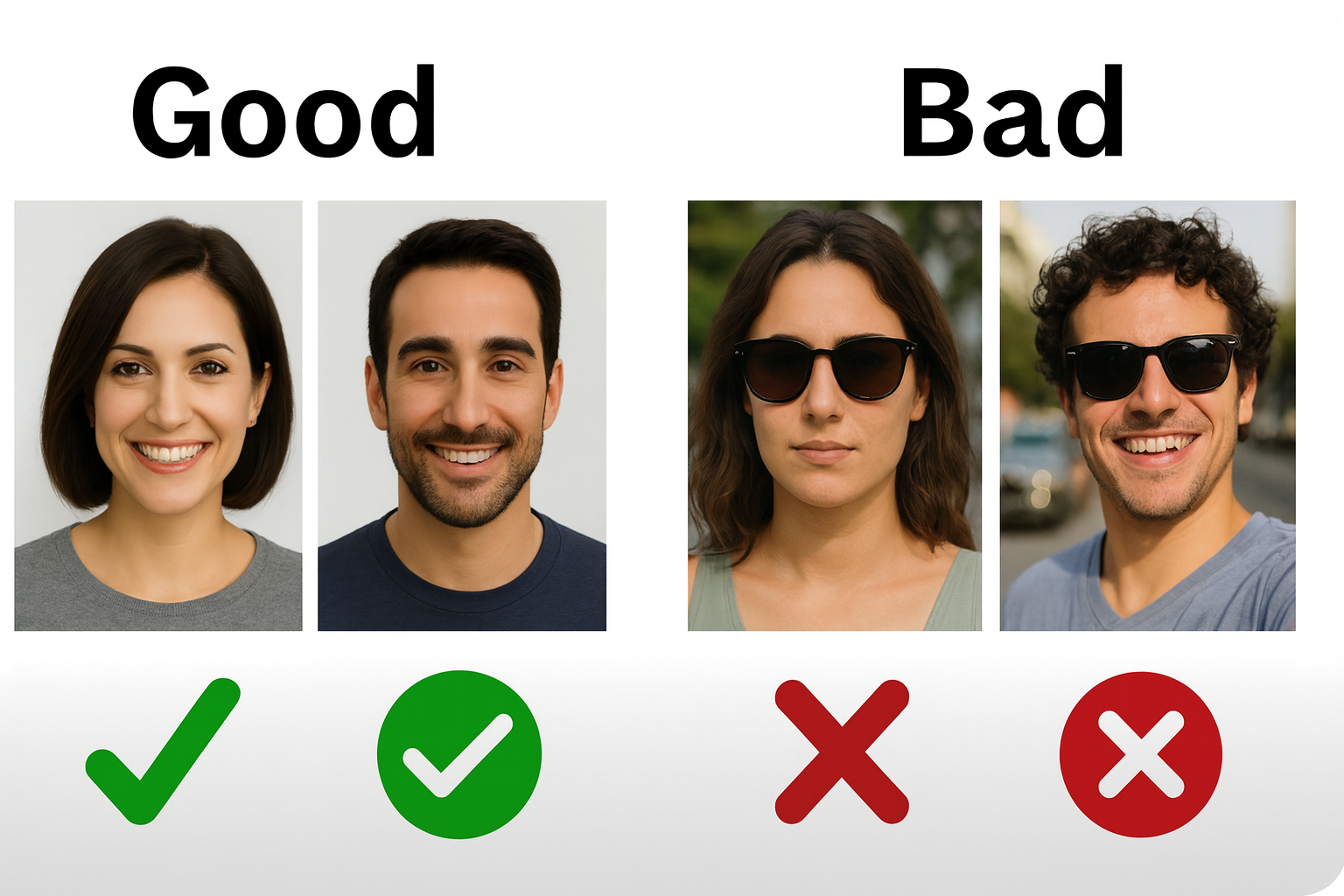
Please upload a clear photo of your face. This helps owners trust you.

Photo Requirements

  • ✔ Bright, clear, well-lit
  • ✔ Friendly expression
  • ✔ JPEG or PNG
  • 600×600 px

Avoid

  • ✘ Dark or blurry photos
  • ✘ Group photos
  • ✘ Sunglasses or filters

Need Help?

If your photo isn’t the right size, use the tool below to automatically resize it to 600×600.

📸 Resize Your Photo to 600×600

Upload your photo and it will be resized automatically to 600×600.

×
⬇️ Download 600×600 Image
💡
After downloading your resized image, upload it into your sitter profile.
You can drag the photo to reposition it inside the circle before saving.

📩 Trouble Uploading Your Photo?

If you're having trouble resizing or uploading your profile picture, we can do it for you.

💡
Can't upload your photo? Email it to us and we'll resize it to 600×600 and upload it for you.
Make sure your file is in JPG or PNG format for the best results.

✨ What Your Final Sitter Profile Will Look Like ⬇️

This is the heading

🐾 Name: Sarah M. Brooklyn Cat Sitter

Bio Example:

Hi! I’m Sarah, a lifelong cat lover with 6+ years of experience caring for kittens, adult cats, and seniors. I specialize in helping shy or anxious cats feel safe and comfortable while their owners are away. My goal is to keep your cat’s routine consistent, send daily photo updates, and leave your home just as tidy as I found it.

Experience & Services:

  • 6+ years of cat-sitting for friends, neighbors, and repeat clients
  • Comfortable with shy, senior, and special-needs cats
  • Can give oral medication and follow specific feeding routines
  • Daily updates with photos and notes after each visit

Location Example:

  • Neighborhood: Downtown Brooklyn, NY
  • Service Area: Within ~20 minutes of Downtown Brooklyn

Tip for Writing Your Own Profile:

  • Introduce who you are
  • Explain your cat-care experience
  • Share what makes you a great sitter
  • Mention your general area (but not your full address)

FaQ

To approve an appointment:

  1. Go to Sitter DashboardAppointments

  2. Find the booking marked Pending

  3. Click the orange Pending icon

  4. Change it to Approved
    When you approve it, the owner will immediately see that you’re available and interested.

This happens only when you don’t change the appointment from Pending → Approved.
Make sure you update your appointment status so the owner receives your confirmation.

  • Go to Sitter DashboardAvailability

  • Select the dates and times you’re available

  • Click Save
    Your availability helps owners book you faster and avoid conflicts.

After you pass the quiz, click the button on this page:
“I’ve Completed My Profile / Quiz”
This notifies our team so we can send you the next steps.

You will receive training materials after your profile review and phone call.
Make sure your availability and questionnaire are completed first.

Once you submit your availability, a team member will schedule a phone call with you.
After the call, we verify your details and send the next steps.

You will receive your credentials only after:
✔ Questionnaire
✔ Availability
✔ Phone call
✔ Quiz
✔ Training review
Once approved, you’ll get a welcome email with your login details

Yes, but only after your phone call and profile review.
We will send you the background check form separately when necessary.

Click Email Support Team on this page and send your updated photo.
We’ll resize and upload it for you.

Refresh your dashboard or log out and log back in.
If you still don’t see them, contact support — sometimes syncing takes 1–2 minutes.

💬 Need Help?
We're here to support you at every step of your onboarding. If you need help with your photo, profile, or next steps, reach out anytime.
📩 Email Support Team
Already in Slack? You can drop your questions in the #all-felinetails-sitter-collective channel too.
🚀

Final Step — NDA Confirmation

When you click below, our team will be notified and will send you the official Sitter NDA to sign and complete your onboarding.

✅ Thanks! We’ve received your NDA request and will email the document shortly.
Need help getting started?
Feline Tails Assistant